CHECKBOX
Android checkbox is used to select more than one option at a time.
Example: In an admission form we may need to select both diploma & BE in Graduate option.
For this we can use checkbox which will enable us to select multiple options.
SOURCE CODE [main.xml] is
<LinearLayout android:id="@+id/LinearLayout01"
android:layout_width="fill_parent"
android:orientation="vertical">
<CheckBox android:id="@+id/check1"
<CheckBox android:id="@+id/check2"
import android.app.Activity;
import android.os.Bundle;
import android.view.View;
import android.view.View.OnClickListener;
import android.widget.Button;
import android.widget.CheckBox;
import android.widget.Toast;
public class CheckBoxExample extends Activity implements OnClickListener
{
}
if (c1.isChecked()==false && c2.isChecked()==true)
{
msg = Toast.makeText(CheckBoxExample.this,
"Iphone", Toast.LENGTH_SHORT);
msg.show();
}
if (c1.isChecked()==false && c2.isChecked()==false)
"Nothing Selected", Toast.LENGTH_SHORT);
msg.show();
}
The OUTPUT will be
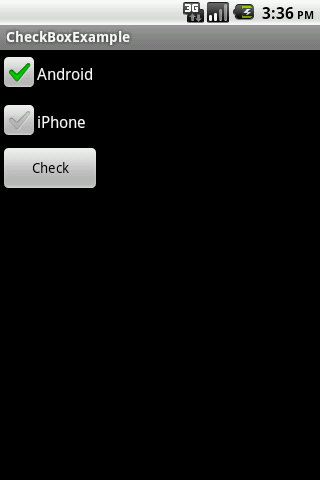

Android checkbox is used to select more than one option at a time.
Example: In an admission form we may need to select both diploma & BE in Graduate option.
For this we can use checkbox which will enable us to select multiple options.
SOURCE CODE [main.xml] is
<LinearLayout android:id="@+id/LinearLayout01"
android:layout_width="fill_parent"
android:layout_height="fill_parent"
xmlns:android="http://schemas.android.com/apk/res/android"android:orientation="vertical">
<CheckBox android:id="@+id/check1"
android:layout_width="100px"
android:layout_height="wrap_content"<CheckBox android:id="@+id/check2"
android:layout_width="100px"
android:layout_height="wrap_content"android:text="iPhone" />
<Button android:id="@+id/button1"android:layout_width="100px"
android:layout_height="wrap_content"android:text="Check" />
</LinearLayout>import android.os.Bundle;
import android.view.View;
import android.view.View.OnClickListener;
import android.widget.Button;
import android.widget.CheckBox;
import android.widget.Toast;
{
Button b1;
CheckBox c1, c2;
Toast msg;
public void onCreate(Bundle icicle)
{
super.onCreate(icicle);
setContentView(R.layout.main);
c1 = (CheckBox) findViewById(R.id.check1);
c2 = (CheckBox) findViewById(R.id.check2);
b1 = (Button) findViewById(R.id.button1);
b1.setOnClickListener(this);
}
public void onClick(View arg0)
{
// TODO Auto-generated method stub
if (c1.isChecked()==true && c2.isChecked()==true)
{
msg = Toast.makeText(CheckBoxExample.this,
"Android and Iphone", Toast.LENGTH_SHORT);
msg.show();
}
if (c1.isChecked()==true && c2.isChecked()==false)
{ msg = Toast.makeText(CheckBoxExample.this,
"Android", Toast.LENGTH_SHORT);
msg.show();}
if (c1.isChecked()==false && c2.isChecked()==true)
{
msg = Toast.makeText(CheckBoxExample.this,
"Iphone", Toast.LENGTH_SHORT);
msg.show();
}
if (c1.isChecked()==false && c2.isChecked()==false)
{
msg = Toast.makeText(CheckBoxExample.this,"Nothing Selected", Toast.LENGTH_SHORT);
msg.show();
}
}The OUTPUT will be

